Skip to content
Hovera
Hovera Move

Know what you have, where it is, and when it runs out.

Hovera Move keeps one record of every item across your warehouses, depots and sites. You see who holds it, what's on the road, and which site runs short first. Every change is signed, and nothing gets rewritten.

app.hovera / move
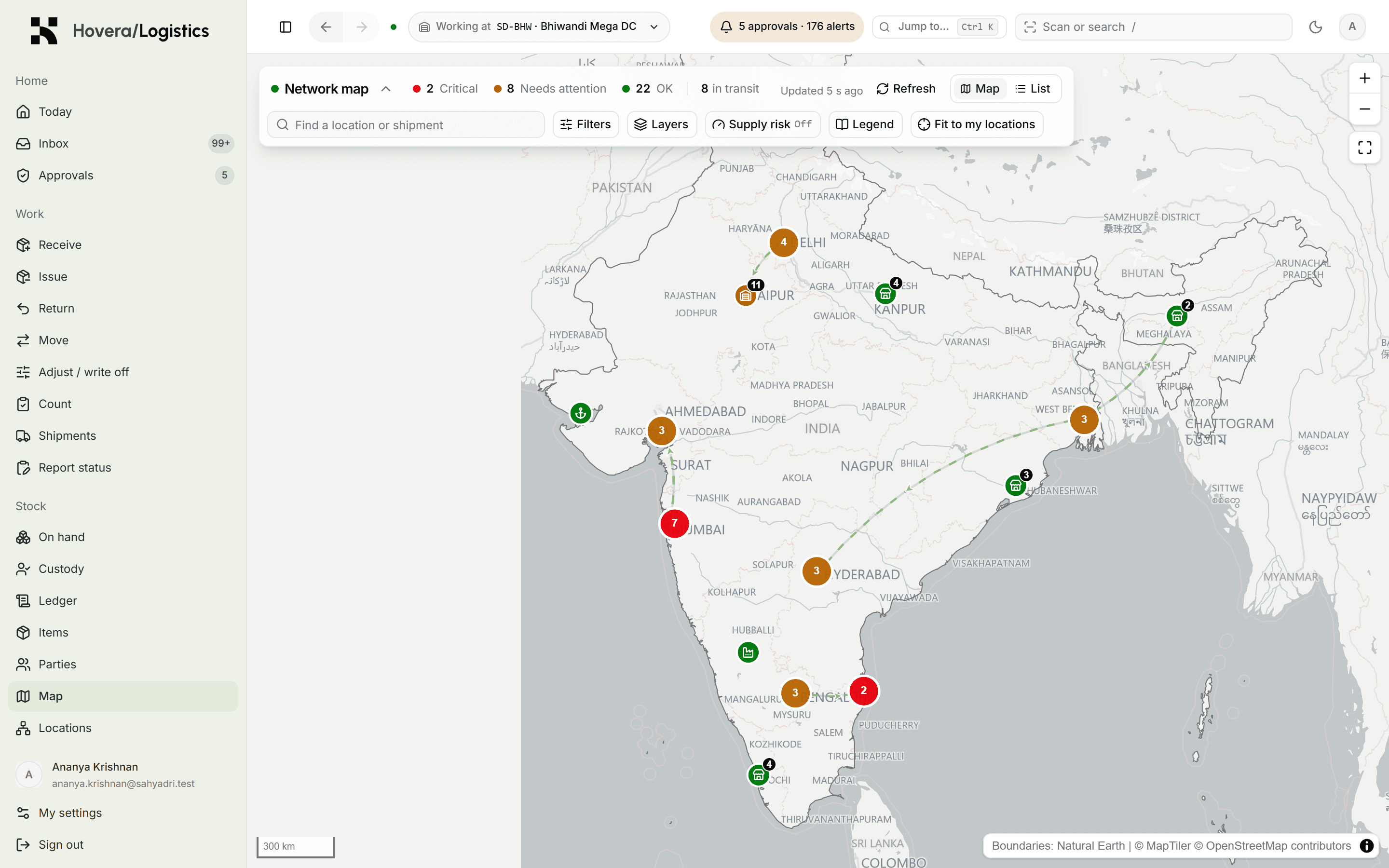
Hovera Move network map showing warehouses as coloured pins and shipments in transit as arcs

Fig. 01·Hovera Move · Stock and shipmentsDemo data

What it replaces

From guesswork to Hovera Move.

Today

  • A spreadsheet three people edit at once
  • Shortages you hear about when a site calls
  • Losses that only show up at the annual count
  • Searching inboxes for who approved a write-off

With Hovera Move

  • One ledger your whole network shares
  • A run-out date weeks before the shelf is empty
  • Blind counts on any day, with every variance on record
  • Every approval named, timed and one click away

01 · The ledger

A record nobody can rewrite.

Every receipt, issue, move, count and write-off is added to a ledger that is never edited. A mistake is fixed with a new entry, so both stay visible. Stock can never go negative.

  • Track by quantity, by lot with expiry, or by serial number
  • See who holds each serial-tracked item today
  • Open any serial number and read its whole life story
app.hovera
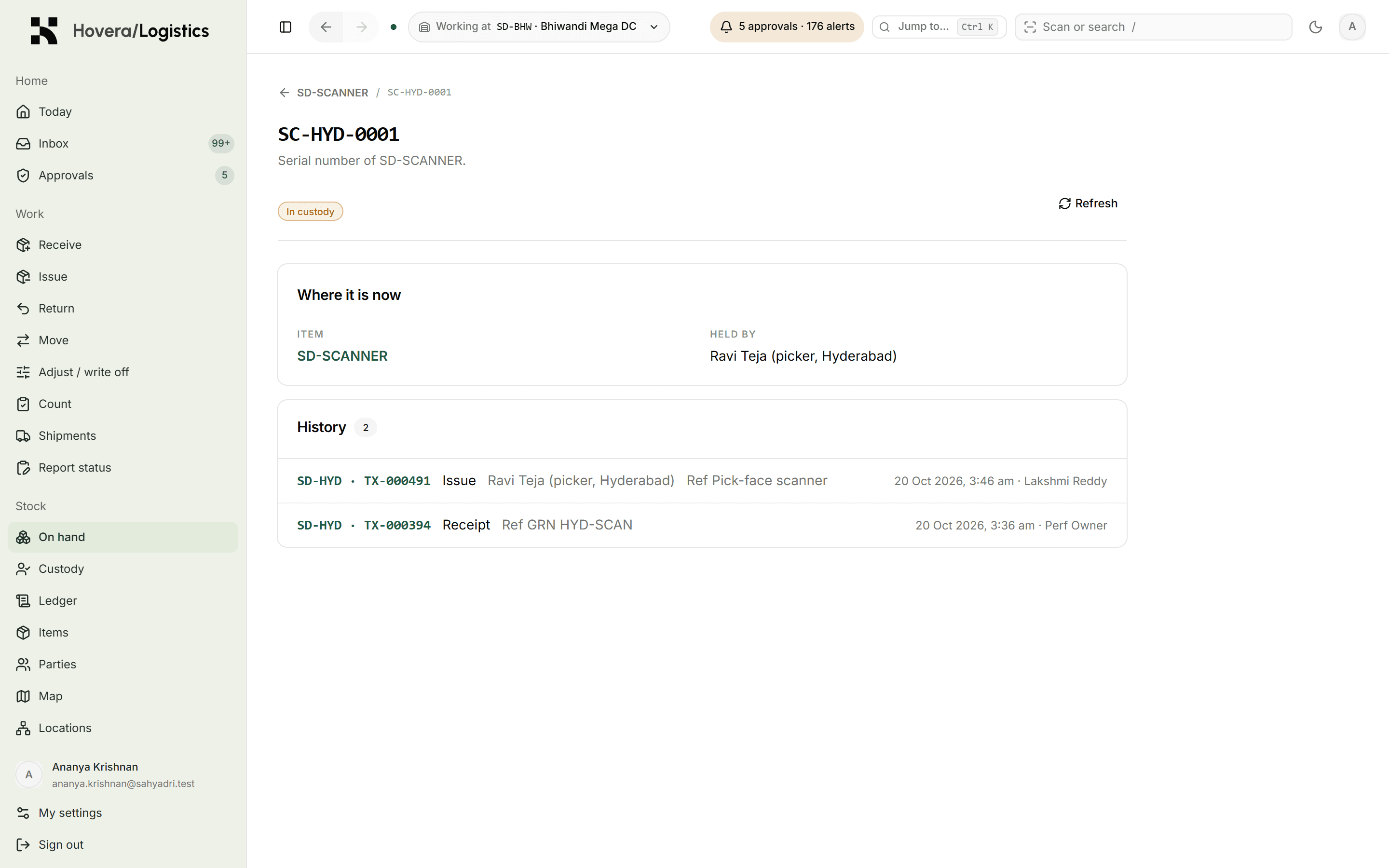
The full history of one serial number: every location, holder and approver

Fig. 02·The ledgerDemo data

02 · Approvals

A second person on the decisions that matter.

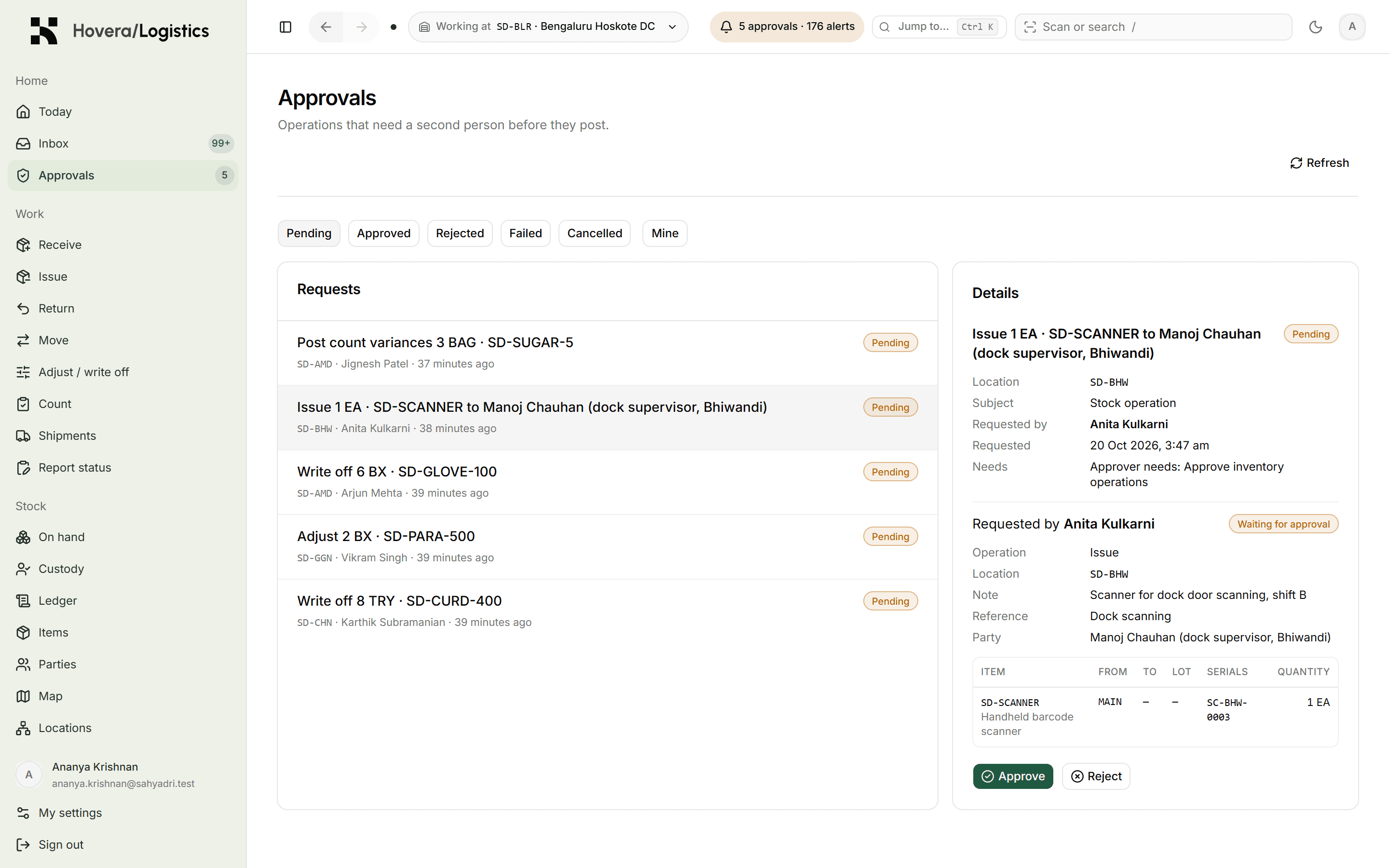
You set the rules by item class and by action. Writing off a controlled item waits for a second signature, and the person who asked can never be the one who approves.

  • Rules by class: Standard, Controlled, Sensitive
  • The approver sees the exact stock lines they sign for
  • Every decision keeps who asked, who said yes, and when
app.hovera
Approvals inbox with a write-off waiting for a second person

Fig. 03·ApprovalsDemo data

03 · The network

Your whole network on one map.

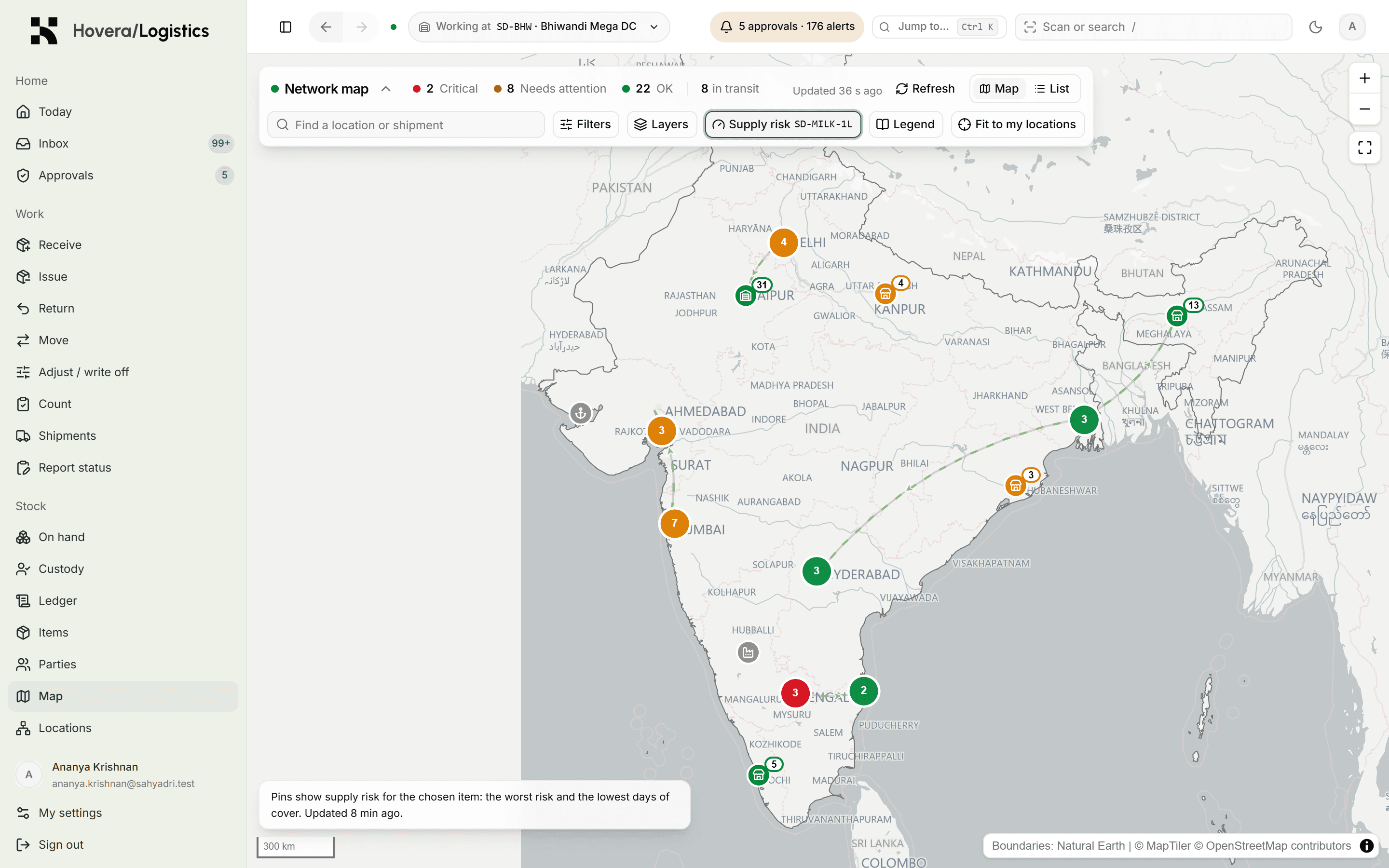
Every warehouse, depot, supplier and port gets a pin. Colours show which sites are healthy and which need help. Arcs show stock on the road, and whether it is on time.

  • Site health at a glance: critical, warning, counting, OK
  • Shipments marked on time, due today, overdue or part-received
  • Works offline from a map file on your own server
app.hovera
Map coloured by supply risk for one item across every location

Fig. 04·The networkDemo data

04 · Forecast

See which site runs out, and when.

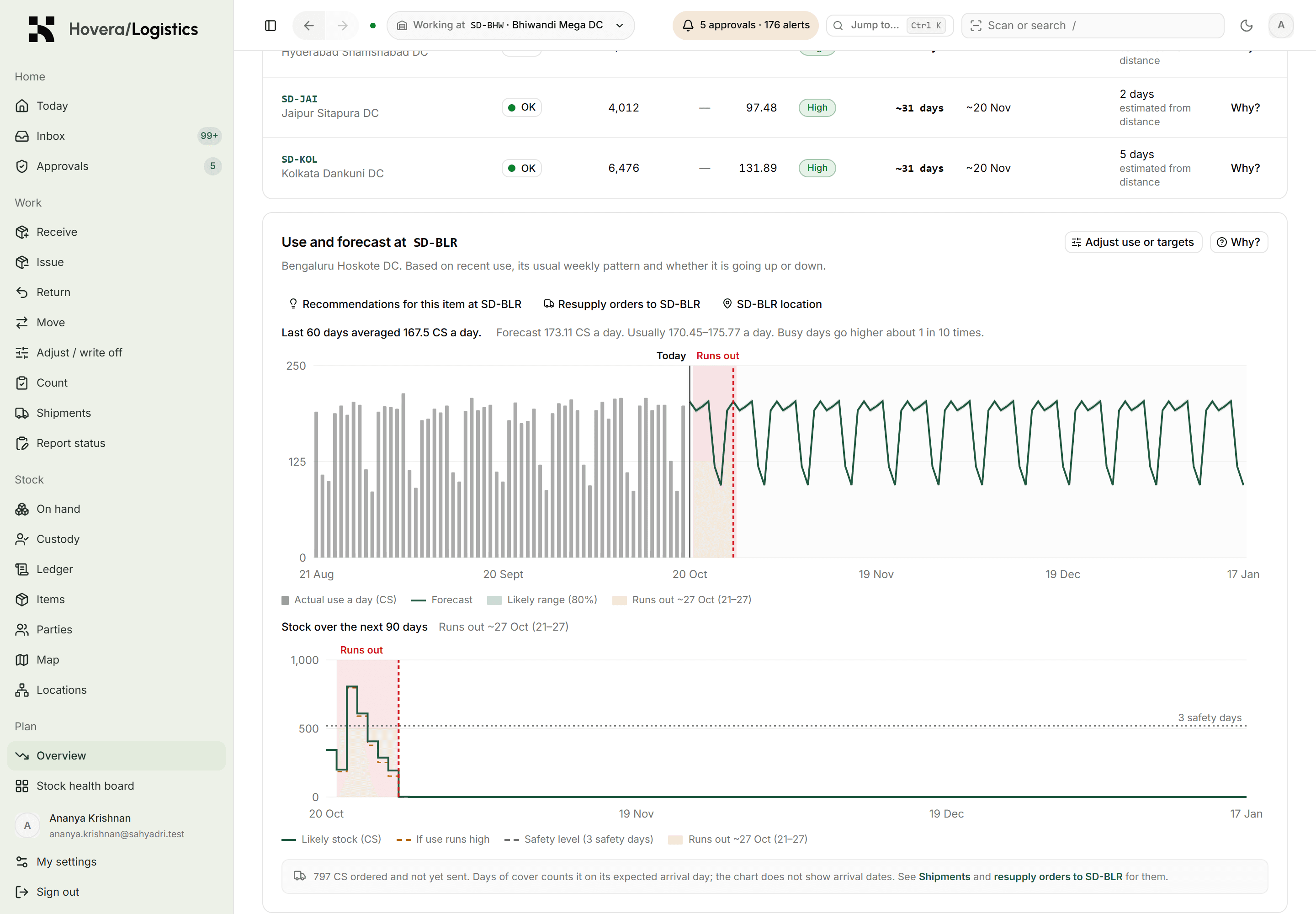
Hovera measures how fast each site uses each item, adds what's on hand, on the road and on order, and looks ninety days ahead. You get a date with a range. Days left are rounded down, so a site never looks safer than it is.

  • “Runs out ~15 Nov (12–19)” instead of a guess
  • Every forecast shows its method and its past accuracy
  • Override it, with a reason, when you know something the data doesn't
app.hovera
Forecast chart projecting stock for one item at one site, with the run-out range highlighted

Fig. 05·ForecastDemo data

05 · Resupply

Fix the shortage before it happens.

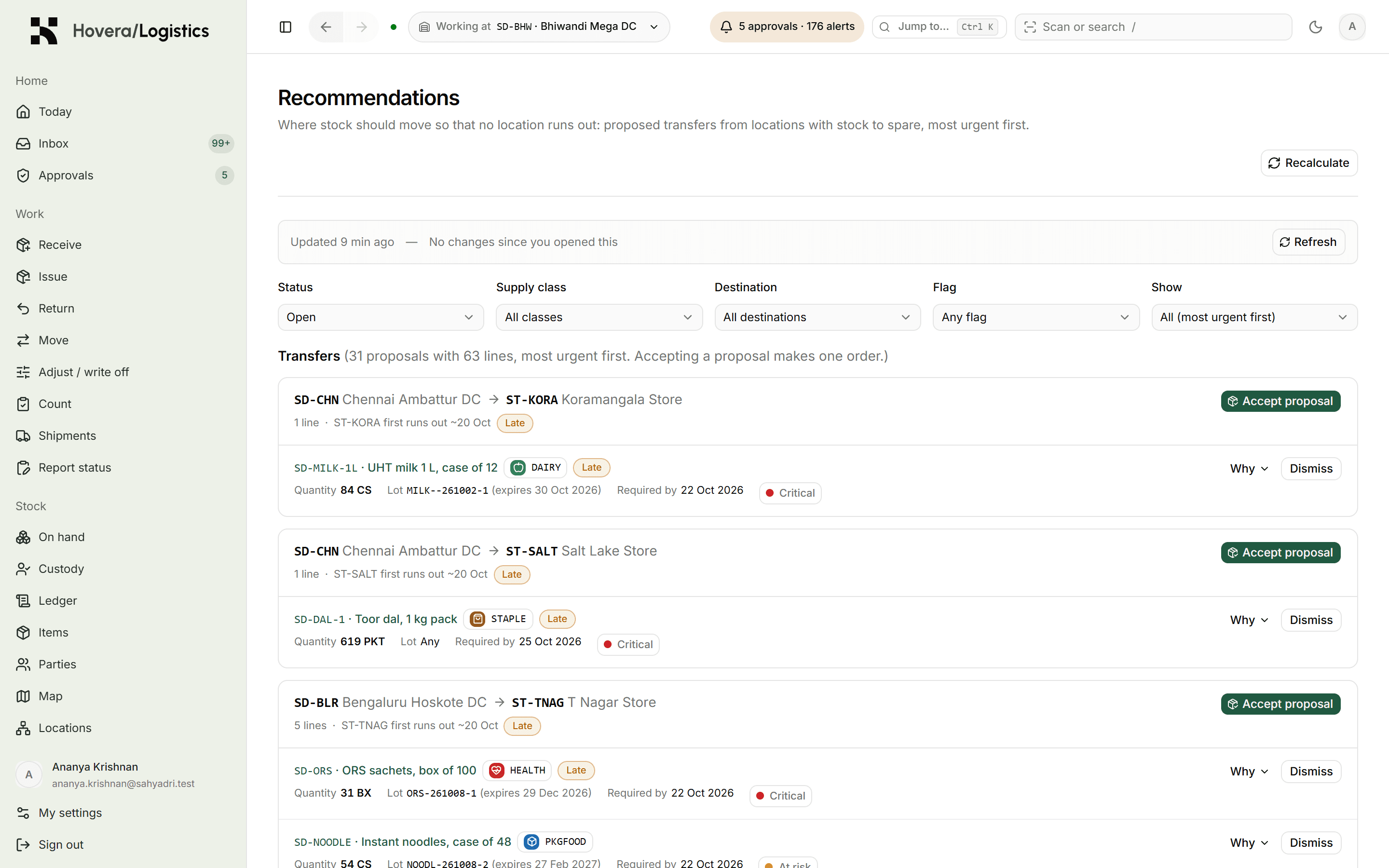
Hovera suggests moving stock from sites with too much to sites heading for a shortage, sized by the real travel time between them. A planner accepts, edits or declines. Accepted suggestions become tracked orders.

  • Most urgent first, with the reason shown
  • Sized by each route's real lead time
  • Orders ship as tracked shipments, received against the plan
app.hovera
Resupply recommendations ranked by urgency, each with accept and decline

Fig. 06·ResupplyDemo data

06 · Phone reports

Sites without a warehouse system still count.

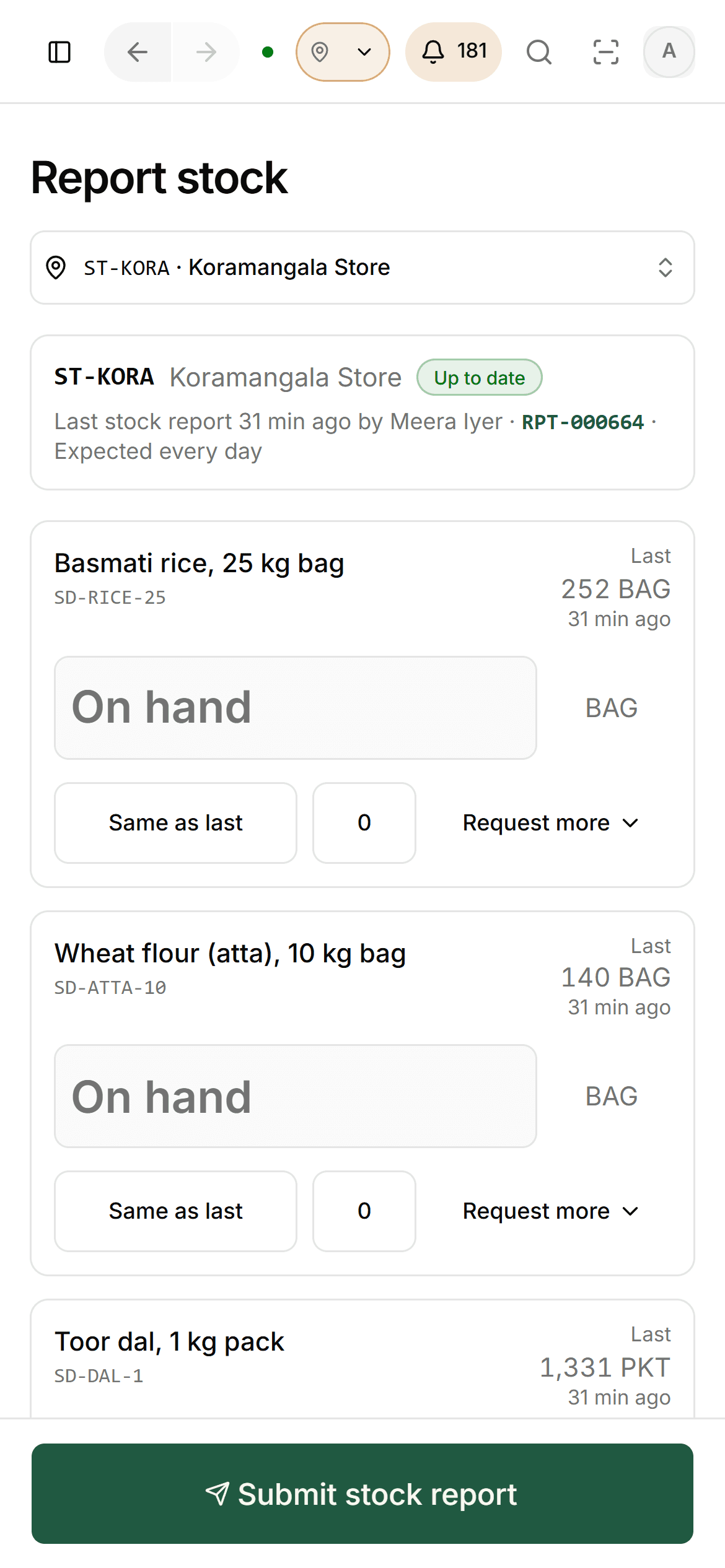
A shop, a job site or a field unit can send its stock levels from a phone in a minute. Hovera works out what they used and plans them alongside your warehouses.

  • A short phone form, with a flag for urgent needs
  • CSV import when reports arrive in a batch
  • The plan updates about 20 seconds after a report on a quiet system
Stock report form on a phone with on-hand quantities and a submit button

Fig. 07·Phone reportsDemo data

07 · Scenarios

Rehearse a bad week before it happens.

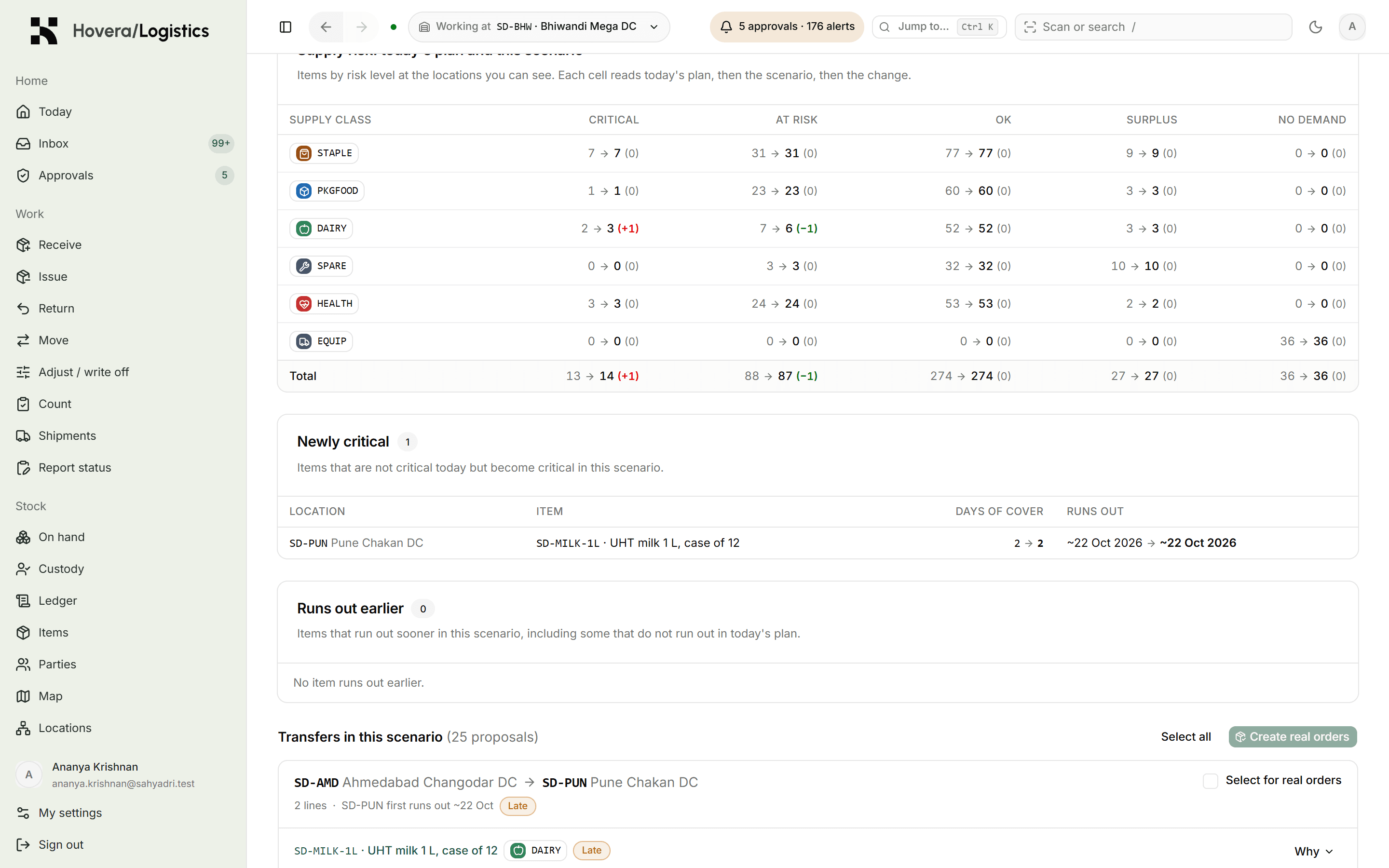
Close a route, cut off a site or double demand, then see which locations run short and when. Hovera proposes the moves that prevent it, and you can send them as real orders.

  • Demand surges, closed routes, sites cut off
  • Shortfalls by location and by date
  • Turn the plan into real orders in one step
app.hovera
Scenario results showing what a closed distribution centre does to the network

Fig. 08·ScenariosDemo data

A day with it

A day with Hovera Move.

  1. 07:40

    Head of operations

    Opens the stock health board. Two sites are red on cold-chain items. Everything else is green.

  2. 08:05

    Planner

    Accepts three resupply suggestions. They become orders the sending sites can see straight away.

  3. 11:20

    Store manager, Pune

    Sends the morning stock count from a phone. The plan for Pune updates before the call ends.

  4. 15:10

    Storekeeper, Nashik

    Receives a shipment four cartons short. The shortage is recorded and a supervisor approves closing it.

  5. 17:30

    Finance

    Asks who approved last week's write-off. One click shows the name, the time and the exact lines.

Specs

The details, plainly.

Ledger
Never edited. Corrections are new entries.
Tracking
Quantity, lot with expiry, serial number
Approvals
By item class and action. The requester can't approve.
Counts
Blind. The counter never sees the expected number.
Forecast
90 days ahead, lot by lot, expiry-aware
Replanning
About 20 s after a new report on a quiet system
Map
Works offline from your own map server
Sign-in
MFA, smart card, LDAP, OIDC
Install
Your cloud or your servers. Can run fully offline.
Hardware
One site on 3–4 vCPU and 4 GB RAM in our tests
Data
REST API, CSV import and export
Roles
Defined by you. People see only their own sites.

Questions

Asked by people like you.

Do we have to replace our ERP?

No. Keep it for finance and purchasing. Move sits beside it as the record of what you hold, who has it and who approved each change. CSV files and an API move data between the two.

What does “a record nobody can rewrite” actually mean?

Nothing is ever overwritten. If someone types 50 instead of 5, the fix is a new entry, and both lines stay visible with names and times. Balances are rebuilt from that history and checked on a schedule.

Can it run without an internet connection?

Yes. You can install it on your own servers inside your own network. The map and everything else work with no outside connection.

Our sites don't scan barcodes. Will it still work?

Yes. Sites can send their stock levels from a phone form or a CSV file, and Hovera plans them alongside your scanned warehouses.

Is the forecast a black box?

No. Every forecast shows how it was worked out, the history it used and how accurate it has been for that item. Planners can override it and record why.

How soon will we know if it works for us?

The pilot runs for 90 days on one region of your network. By the end you have your own numbers: forecast accuracy, shortages caught early, hours saved.

See Hovera Move on your own problem.

Book a call with the founder. Bring one real case and we'll walk through it in Hovera, with sample data shaped like yours.